
Loading article…

Write and run Python, SQL, C, C++, JavaScript and HTML on a phone or school computer, with nothing to install. What runs where, and a first program.
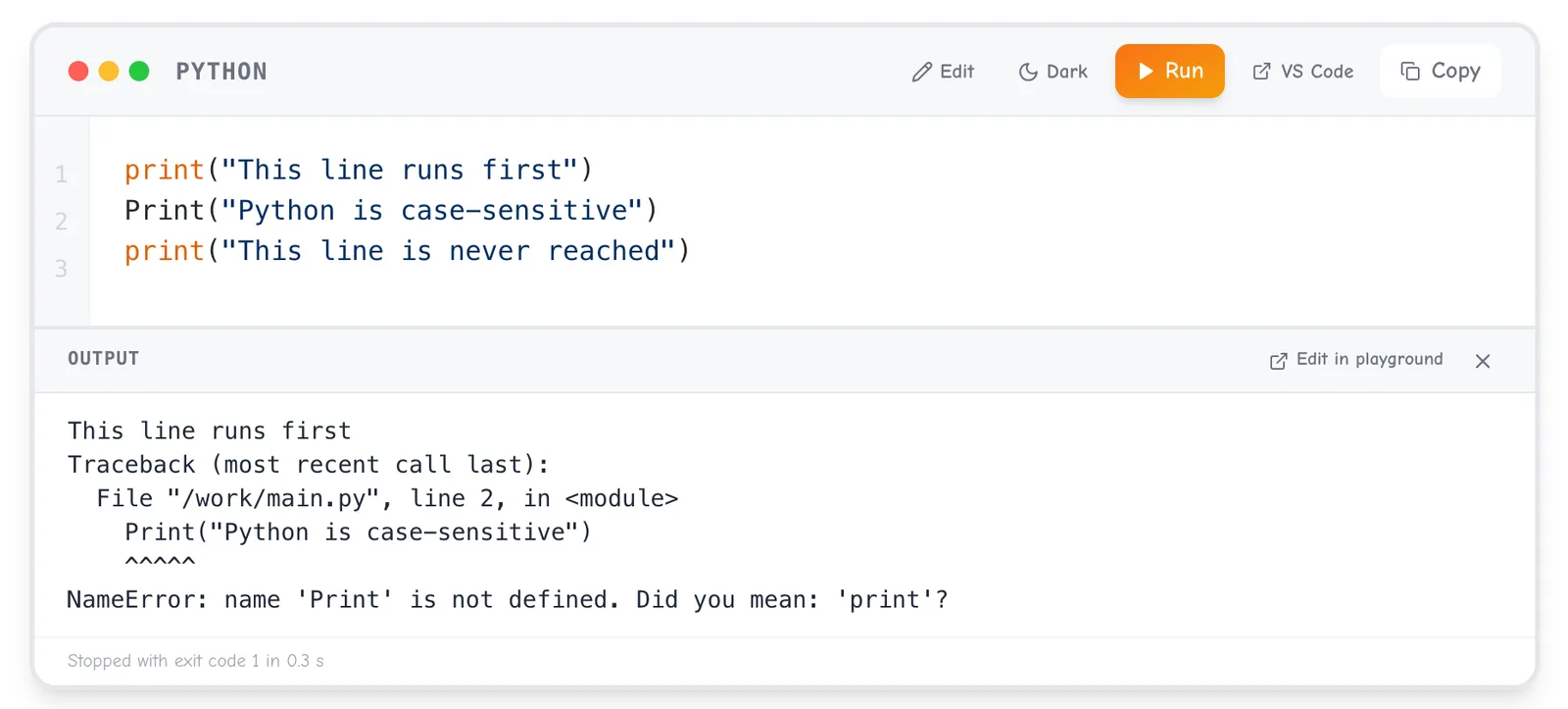
Here are three lines of Python. Before you run them, guess what they print.
print("This line runs first")
Print("Python is case-sensitive")
print("This line is never reached")
Python prints the first line, then stops at line 2. Its error message ends:
NameError: name 'Print' is not defined. Did you mean: 'print'?
To Python, print and Print are different names, and only the small-letter one exists. The program stops at the error, so line 3 never runs. Fix the capital P and all three lines appear.
That example is in Introduction to Python, the first lesson of Ganzaa's S4 ICT unit Python Programming I. Press Run under it and you see the same error, on a phone or a school computer, with nothing to install and no account.
Guessing first and then running the code is a teaching method with a name: PRIMM, for Predict, Run, Investigate, Modify, Make. In their 2019 paper, Sue Sentance, Jane Waite and Maria Kallia describe the steps: predict what a program will do, run it to test the prediction, investigate how it works, modify it, then make a new program that uses the same structures for a new problem.
They tried it in 13 schools with 493 students aged 11 to 14, alongside a control group, over 8 to 12 weeks of programming lessons. In their words: "Learners performed better in the post test than the control group."
A study of an online course points the same way. Kenneth Koedinger and colleagues at Carnegie Mellon University looked at a psychology course and found "that students doing more activities learn more than students watching more videos or reading more pages." It was not a coding course, and the authors call their data "correlational in character", so take it as a general point about learning by doing.
My advice: every time a lesson shows you code, say what you think it will print before you press Run. When your guess is wrong, you have found exactly the thing to learn next.
The Ganzaa playground has eight language buttons down its left edge, and seven of them run code today. Four run inside your browser. Three are sent to Ganzaa's server, run in a sandbox, and the output comes back to you.
| Language | Where it runs |
|---|---|
| JavaScript | Your browser |
| React (JSX) | Your browser |
| HTML and CSS | Your browser, shown in a preview |
| SQL (SQLite) | Your browser |
| Python 3 | Ganzaa's server |
| C (gcc, C17) | Ganzaa's server |
| C++ (g++, C++17) | Ganzaa's server |
| Java | Not yet: its button says "not set up on this server yet" |
Python's input() really waits: you type your answer into the output, after the question, and press Enter. On a phone, Code and Output are two tabs.
Browser languages need the internet to load the page, not to run: in tests, running short JavaScript, React, HTML and SQL programs made no network requests. Python, C and C++ need a connection for every run, but your phone only sends the code and shows what comes back. One short Python run used about 3 KB.
The first page load costs more. Measured on 5 November 2026 in a fresh Chrome browser, the Python page downloaded about 480 KB and the SQL page about 830 to 850 KB, including the SQL engine (about 340 KB). The JavaScript and React pages came to about 1 MB, because they also load React and Babel. Opening the SQL page again in the same browser downloaded less than 1 KB.
Without an account, the playground keeps your latest code for each language in that browser. If your school computer clears its browser data when you log out, that copy goes too, so download or save before you leave.
Teachers: signed-out Python, C and C++ runs share one allowance per internet address, half of what each signed-in student gets. A class on one school network may share one address, so ask students to sign in for lessons in those languages. SQL, HTML and JavaScript run in the browser, so the limit does not touch them.
Open the Python playground, delete the example, and type:
name = input("What is your name? ")
marks = [62, 75, 81]
average = sum(marks) / len(marks)
print("Muraho,", name)
print("Your average is", round(average, 1))
Predict first: what will the last line print? Then press Run (or Ctrl+Enter, ⌘+Enter on a Mac), type your name after the question and press Enter. With the name Aline you get:
Muraho, Aline
Your average is 72.7
Now modify it: add a fourth mark, 90, and the average becomes 77.0. Then make something new, a program that adds two numbers:
a = input("First number: ")
b = input("Second number: ")
print(a + b)
Type 3 and 4 and it prints 34, not 7, because input() always gives you text and adding text joins it. Write a = int(input("First number: ")), do the same for b, and it prints 7.
Open the SQL playground, delete the example, and run this:
CREATE TABLE pupil (name TEXT, class TEXT, marks INTEGER);
INSERT INTO pupil VALUES ('Aline', 'S1', 82), ('Jean', 'S1', 64), ('Grace', 'S2', 91), ('Olivier', 'S2', 58);
SELECT name, marks FROM pupil WHERE marks >= 60 ORDER BY marks DESC;
You get three rows: Grace 91, Aline 82 and Jean 64. The WHERE line leaves out Olivier's 58. Now delete everything, type this, and run it:
SELECT class, COUNT(*) AS pupils, AVG(marks) AS average FROM pupil GROUP BY class;
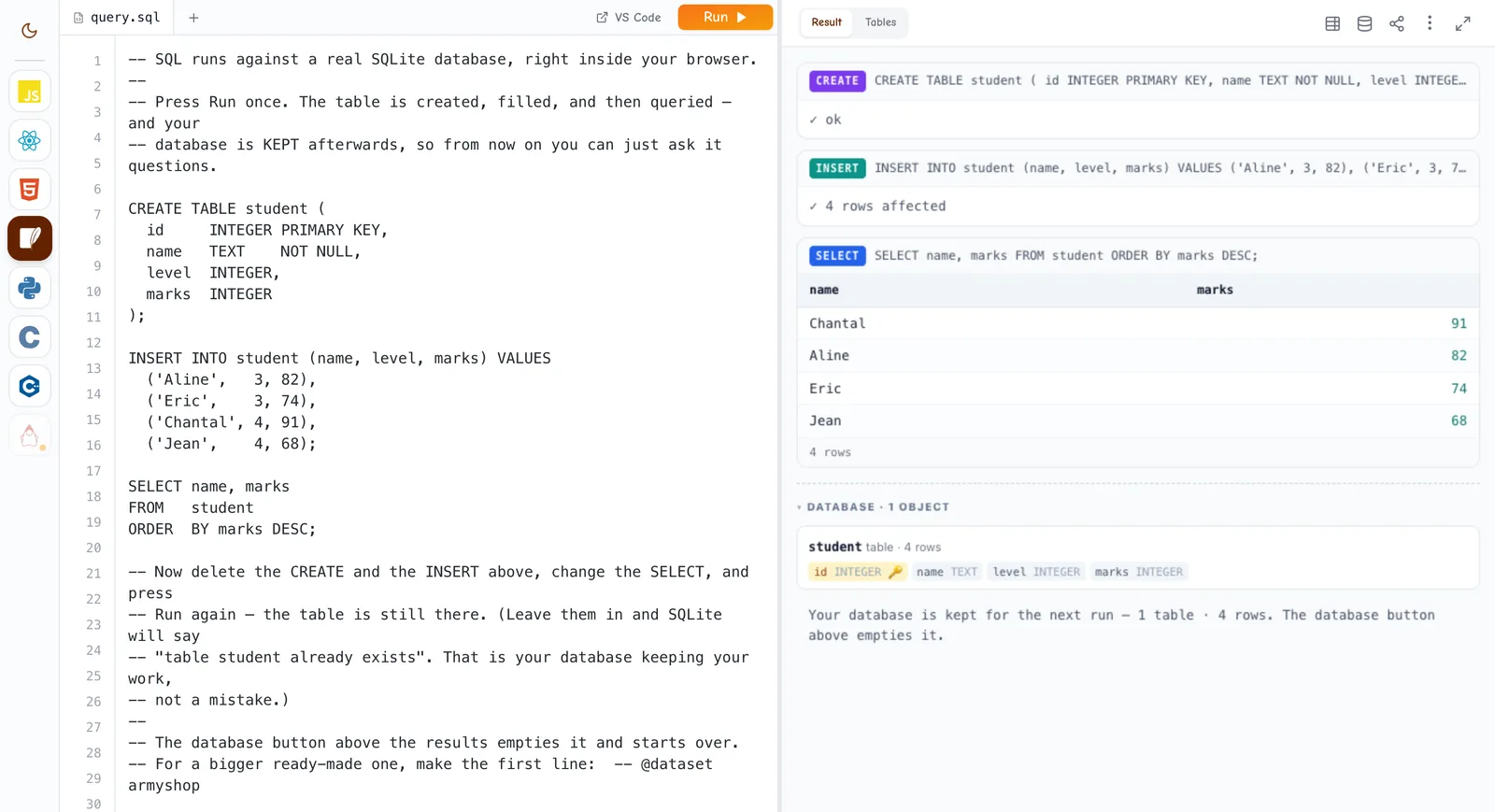
It still works, because the playground keeps your database between runs: S1 averages 73 and S2 averages 74.5. Run the CREATE TABLE line again and SQLite tells you the table already exists. The database button above the results empties it.
Each runnable example in a lesson has a Run button, and the output appears right under the block. Edit lets you change the code and run your own version without changing the lesson, and Reset puts the original back. Edit in playground opens the full editor.
The most coding is in S4 ICT, where six of the seven units have code you can run: Digital Logic Fundamentals, Programming Algorithms, Python Programming I, HTML-Based Web Development, Cascading Style Sheets and Database Design. Python Programming I has 16 runnable Python examples across five lessons, from print() to for loops. For SQL, start with Database Concepts. For web pages, start with Introduction to HTML and Page Structure.
Younger pupils start with blocks. The P4 unit Programming for Children uses Turtle Blocks and Scratch, P6 has a Scratch unit of the same name, and S1 to S3 ICT carry on with Scratch units. Block coding happens in those tools, not in the playground.
When you want a full editor on your own computer, Ganzaa has an extension for VS Code, a free code editor. Press VS Code next to Run in the playground or on a lesson's code block: your code is saved to your account, opens in VS Code in a folder called Ganzaa in your home folder, and runs there. Press Save to Ganzaa and the website gets your changes. The button needs a free account and only appears on a computer-sized screen.
Setting it up, as Ganzaa's VS Code page describes:
In VS Code your code runs on your own computer, so the language must be installed there: Python 3, gcc or g++ for C and C++, a JDK 11 or newer for Java, Node.js for JavaScript without a web page, and sqlite3 for SQL. HTML, React and JavaScript web pages need nothing extra. And note the page's warning: code run in VS Code can reach your computer's files, which the playground's sandbox never allows.
Open the Python playground and type the five-line program above. Then work through Introduction to Python and the rest of the unit, predicting each output before you press Run. For more, The Python Tutorial in Python's own documentation is free to read.
15 free games: what each one practises, the class it suits, which need no account, how to play a friend live, and how to make a round count.
Host a free live quiz on Ganzaa: students join on any phone with a PIN, points run from 500 to 1,000, and research shows why quizzing helps memory.
Ganzaa is Rwanda's online learning platform — free for individual students, with REB-aligned practice and past papers. Schools get the first term free.